WBS

WBS
2021
WBS is an Internet of Things company, focused on emergency and commercial lights. All hardware and software solutions are designed in Australia. My contribution was to strategise and implement a Material Design oriented design system for their multi-platform app. During that short time, we also performed on and off-site user research, set the analytics strategy and revamped the app’s UI (EMIoT).
Work Summary
Role(s)

Product Designer
(UX, UI)
PEERS

CEO, Lead Developer, Hardware Engineers
TOOL SET

Figma, Adobe Suite,
MS Suite
SCOPE

End-to-end
PLATFORM

iOS, Android
INDUSTRY

IoT, Commercial Lighting
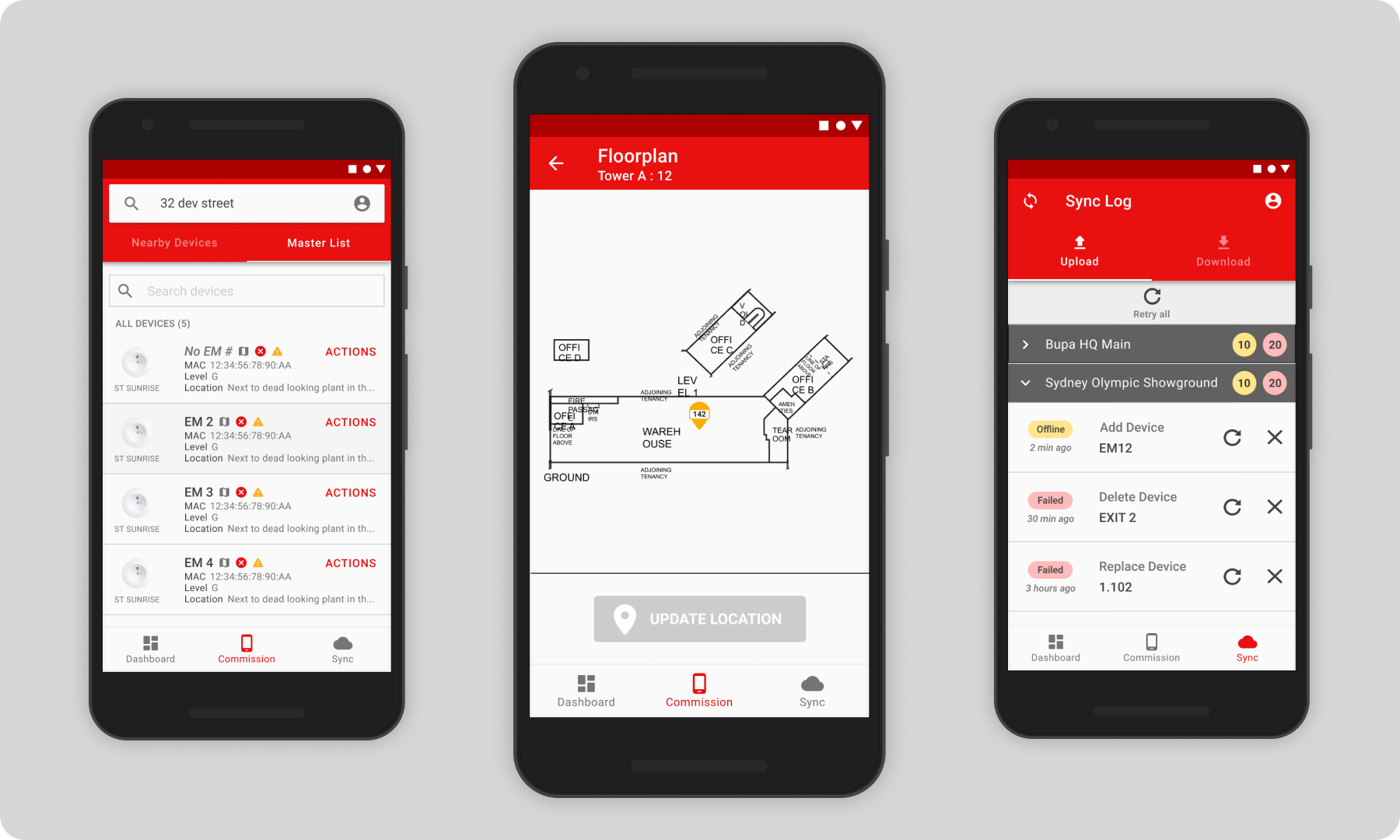
Commissioning devices
Commissioning is the technical jargon that electricians utilise for adding a device to a single database, called Master List. In simpler terms, signing in a new device.
An uncommissioned device has been already installed and tested by a technician or electrician, however not yet added to the app’s Master List.
We decided to dedicate an entire section for uncomissioned devices, named just “Comission”, laying an intuitive path for the user to quickly comission a device, functioning as a perma-filter of this category. Uncomissioned devices might also later become a liability, for security purposes. Another point that corroborates for emphasising this action to the user, located at the center of the bottom menu.
On-site AB Usability Test
The research goal was to Introduce a feature for adding devices without internet connection, displaying multiple device states.
We tested slightly different ways of grouping elements by building (location) and how groups would be visually set apart from units (devices). Both 2 chosen options for the test had their pros and cons.
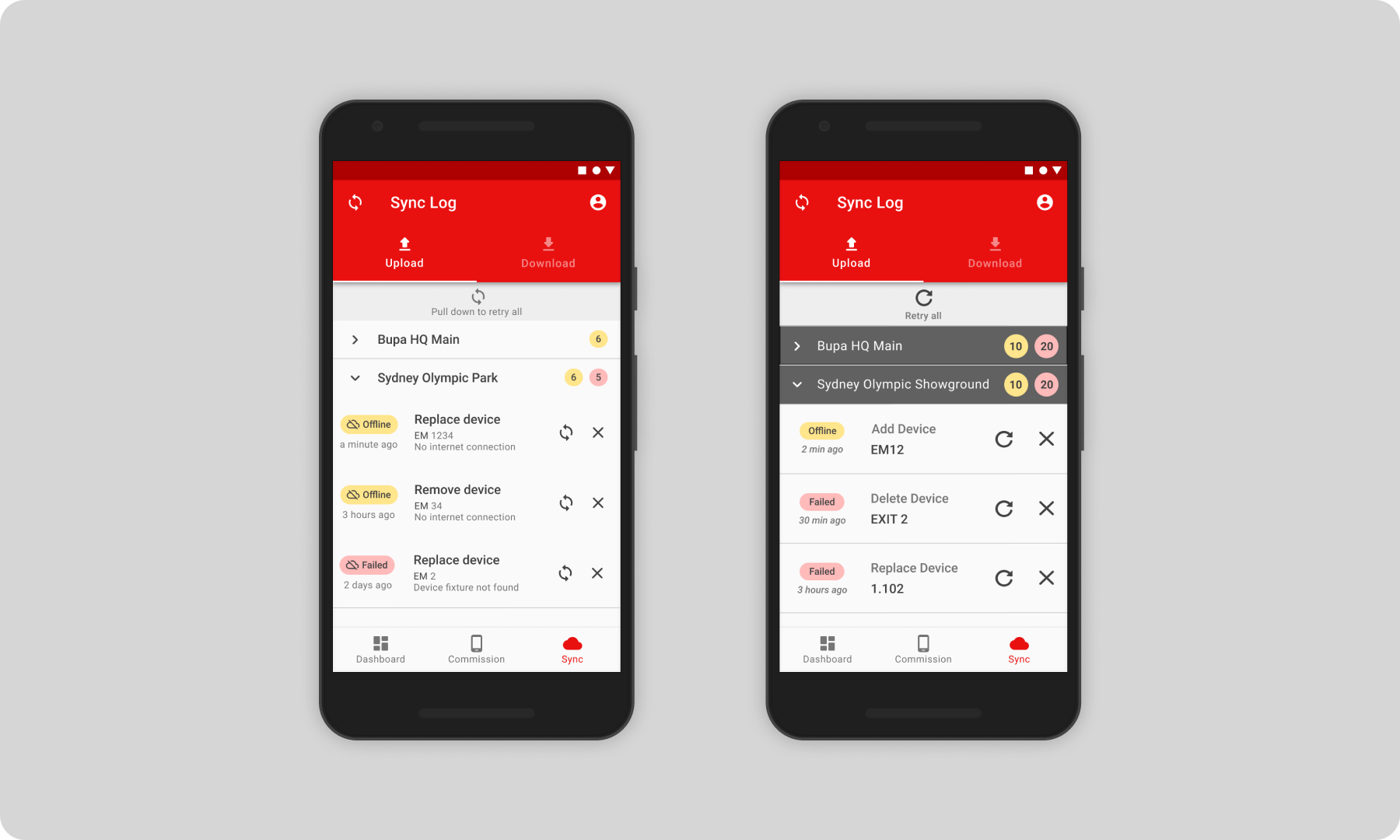
Option A was a bit heavier on data, ensuring that every bit of info is displayed. Option B got a good trimm on the data, specially the repetition of descriptions, allowing utilisation of other UI effects to reduce cognitive load. In this case, contrast for headers.
An usability test was done with existing users for this new feature, called Sync Log. It was conceptualised and designed to help users in cases where there is no internet connection where the devices are, such as ammenities located in very low building levels or [remote] places.
We wanted to validate which of the two UI and data management would work best in this scenario. The location, a major sports venue at Sydney Olympic Park and the test subjects were actual users (in this case, Building Manager) plus members of WBS product team. Each group was designated to commission devices in a particular area or division of the venue.
Material Design System
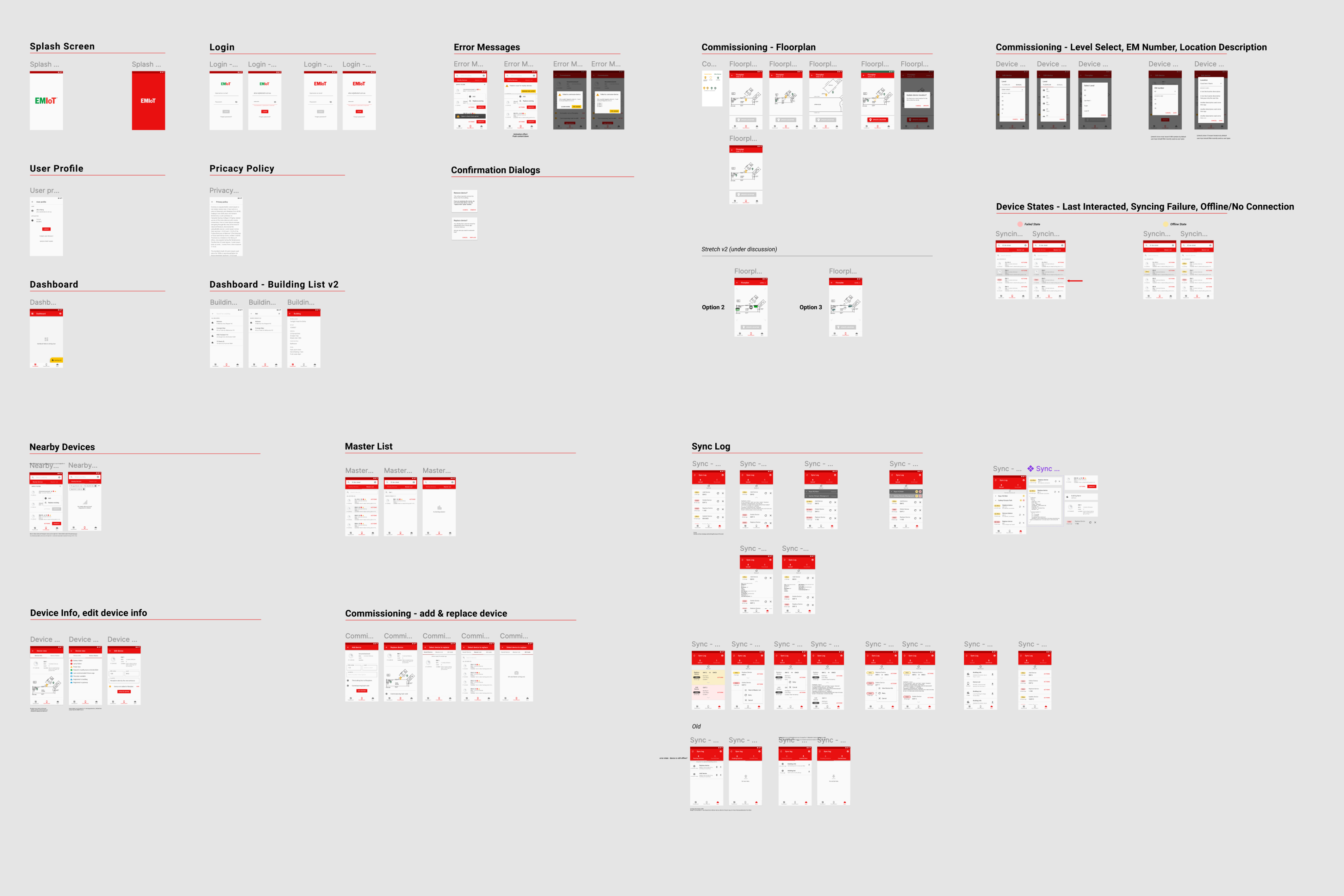
The application was developed Android-first in the beginning, then ported to iOS in the first builds. Along the way, Flutter was implemented and reduced the amount of effort to develop a multi-platform app.
Due to that fact, the design system was heavily based on Google Material Design and its guidelines for User Experience and User Interface, guaranteeing and frictionless user adoption when implementing industry-standard experiences, such as calendar functionality, viewing and editing data, data labelling and minimalistic approach to User Interface.
WBS


Work
U
Cognixus
Thriive
Bet Technology
WBS
Oni
Dell
Let's chat

Work
WBS
2021
WBS is an Internet of Things company, focused on emergency and commercial lights. All hardware and software solutions are designed in Australia. My contribution was to strategise and implement a Material Design oriented design system for their multi-platform app. During that short time, we also performed on and off-site user research, set the analytics strategy and revamped the app’s UI (EMIoT).
Work Summary
Role(s)

Product Designer
(UX, UI)
PEERS

CEO, Lead Developer, Hardware Engineers
TOOLSET

Figma, Adobe Suite,
MS Suite
SCOPE

End-to-end
PLATFORM

iOS, Android
INDUSTRY

IoT, Commercial Lighting
Commissioning devices
Commissioning is the technical jargon that electricians utilise for adding a device to a single database, called Master List. In simpler terms, signing in a new device.
An uncommissioned device has been already installed and tested by a technician or electrician, however not yet added to the app’s Master List.
We decided to dedicate an entire section for uncomissioned devices, named just “Comission”, laying an intuitive path for the user to quickly comission a device, functioning as a perma-filter of this category. Uncomissioned devices might also later become a liability, for security purposes. Another point that corroborates for emphasising this action to the user, located at the center of the bottom menu.
On-site AB Usability Test
The research goal was to Introduce a feature for adding devices without internet connection, displaying multiple device states.
We tested slightly different ways of grouping elements by building (location) and how groups would be visually set apart from units (devices). Both 2 chosen options for the test had their pros and cons.
Option A was a bit heavier on data, ensuring that every bit of info is displayed. Option B got a good trimm on the data, specially the repetition of descriptions, allowing utilisation of other UI effects to reduce cognitive load. In this case, contrast for headers.
An usability test was done with existing users for this new feature, called Sync Log. It was conceptualised and designed to help users in cases where there is no internet connection where the devices are, such as ammenities located in very low building levels or [remote] places.
We wanted to validate which of the two UI and data management would work best in this scenario. The location, a major sports venue at Sydney Olympic Park and the test subjects were actual users (in this case, Building Manager) plus members of WBS product team. Each group was designated to commission devices in a particular area or division of the venue.
Material Design System
The application was developed Android-first in the beginning, then ported to iOS in the first builds. Along the way, Flutter was implemented and reduced the amount of effort to develop a multi-platform app.
Due to that fact, the design system was heavily based on Google Material Design and its guidelines for User Experience and User Interface, guaranteeing and frictionless user adoption when implementing industry-standard experiences, such as calendar functionality, viewing and editing data, data labelling and minimalistic approach to User Interface.
Work
WBS
2021
WBS is an Internet of Things company, focused on emergency and commercial lights. All hardware and software solutions are designed in Australia. My contribution was to strategise and implement a Material Design oriented design system for their multi-platform app. During that short time, we also performed on and off-site user research, set the analytics strategy and revamped the app’s UI (EMIoT).
Work Summary
Role(s)
Product Designer (UX, UI)
PEERS
CEO, Lead Developer, Hardware Engineers
TOOLSET
Figma, Adobe Suite, MS Suite
SCOPE
End-to-end
PLATFORM
iOS, Android
INDUSTRY
IoT, Commercial Lighting
Commissioning devices
Commissioning is the technical jargon that electricians utilise for adding a device to a single database, called Master List. In simpler terms, signing in a new device.
An uncommissioned device has been already installed and tested by a technician or electrician, however not yet added to the app’s Master List.
We decided to dedicate an entire section for uncomissioned devices, named just “Comission”, laying an intuitive path for the user to quickly comission a device, functioning as a perma-filter of this category. Uncomissioned devices might also later become a liability, for security purposes. Another point that corroborates for emphasising this action to the user, located at the center of the bottom menu.
On-site AB Usability Test
The research goal was to Introduce a feature for adding devices without internet connection, displaying multiple device states.
We tested slightly different ways of grouping elements by building (location) and how groups would be visually set apart from units (devices). Both 2 chosen options for the test had their pros and cons.
Option A was a bit heavier on data, ensuring that every bit of info is displayed. Option B got a good trimm on the data, specially the repetition of descriptions, allowing utilisation of other UI effects to reduce cognitive load. In this case, contrast for headers.
An usability test was done with existing users for this new feature, called Sync Log. It was conceptualised and designed to help users in cases where there is no internet connection where the devices are, such as ammenities located in very low building levels or [remote] places.
We wanted to validate which of the two UI and data management would work best in this scenario. The location, a major sports venue at Sydney Olympic Park and the test subjects were actual users (in this case, Building Manager) plus members of WBS product team. Each group was designated to commission devices in a particular area or division of the venue.
Material Design System
The application was developed Android-first in the beginning, then ported to iOS in the first builds. Along the way, Flutter was implemented and reduced the amount of effort to develop a multi-platform app.
Due to that fact, the design system was heavily based on Google Material Design and its guidelines for User Experience and User Interface, guaranteeing and frictionless user adoption when implementing industry-standard experiences, such as calendar functionality, viewing and editing data, data labelling and minimalistic approach to User Interface.